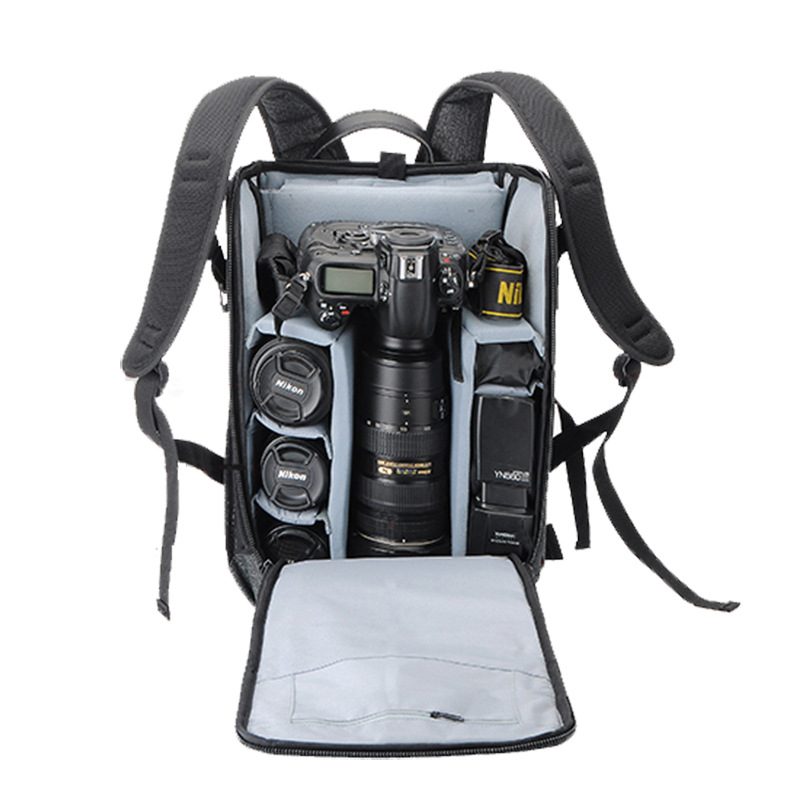
A custom camera bag divider layout should begin with the exact equipment set that users will carry. A request for space for one camera and three lenses is not enough because body dimensions, attached grips, lens lengths, hoods and accessory choices can change the usable arrangement. For an OEM project, a measured kit list and a clear packing sequence give the factory a better starting point than a generic reference photo. This guide is a buyer-planning method; it does not promise impact protection, weather resistance, carrying capacity, price or delivery time.
The cover photograph shows a camera bag reference from the Guangshun Bags website. It is not an approved layout for a specific buyer project or evidence of a tested protection level.
Record the equipment in its packed condition
List every item that belongs in the normal kit: camera bodies, attached grips, lenses, hoods, batteries, chargers, memory-card holders, cables, filters and cleaning accessories. Identify which lens is normally attached to the camera during transport. Record dimensions with caps, hoods or protective sleeves in the position in which they will actually be packed.
Photograph each major item from the top and side and assign it an identifier such as B01 for a body or L01 for a lens. If several product versions may use the same bag, note which equipment set is the primary layout and which alternatives must also be checked. Do not combine their measurements into one imaginary kit.
Use a simple inventory before drawing dividers:
| Equipment group | Buyer information | Layout question to confirm |
|---|---|---|
| Camera body | Maximum packed dimensions, attached lens and grip status | Should it be stored lens-down, sideways or separated from the lens? |
| Lenses | Individual packed dimensions, hood position and retrieval priority | Which lenses need individual cells, and which must be reached first? |
| Batteries and small media | Quantity, holders and access frequency | Should these use a closed pocket, a removable pouch or a divided organizer? |
| Charger and cables | Coiled size and connector protection needs | Can hard accessories be kept away from camera and lens surfaces? |
| Tripod or support accessory | Folded size and intended attachment position | Does the attachment interfere with opening or carrying the bag? |
The proposed cells and clearances should be confirmed on a physical sample with the intended equipment.
Build the divider map around access order
Ask the intended user to describe a normal shooting sequence. Which item is removed first? Does the user change lenses while the bag rests on a table, hangs from a shoulder or remains worn as a backpack? A layout that looks tidy when fully open may be inconvenient if a frequently used lens is blocked by another item.
Draw the main compartment as a simple rectangle and place the equipment identifiers inside it. Mark the opening direction and the user's side of the bag. Give every divider a number so feedback can refer to D01 or D02 instead of phrases such as the divider near the camera. Keep unused space visible on the drawing; it may be needed for finger access, equipment removal or future kit changes.
Divider position and divider construction are separate decisions. The project team should confirm which dividers are fixed, adjustable or removable during sample development. Avoid treating a visual sketch as proof of protective performance. If a particular protection outcome is required, define how the finished design will be assessed and what evidence is needed.
Separate delicate equipment from small hard accessories
Small accessories can move into gaps if their storage is not defined. Give batteries, chargers, cables, adapters and memory-card holders assigned locations rather than leaving them loose beside a camera body or lens. Decide whether the buyer wants a lid pocket, internal zipper pocket, removable pouch or another organized area, then review that choice with the complete kit loaded.
Do not use one pocket label for every small item. Record the intended contents and approximate packed volume. A pocket that holds spare batteries in one market version may not suit a charger and cable set in another. If the accessory list is still changing, identify the open questions before the sample is approved.
Check usable fit on the physical sample
A sample review should test the complete equipment set, not empty divider cells. Use the same equipment identifiers and packing orientation shown on the approved layout drawing. Repeat the check after every divider revision so the feedback remains comparable.
Use this practical review list:
- Place every listed item in its assigned location and record anything left without a defined space.
- Remove and return the camera body using the intended grip points without lifting unrelated equipment.
- Retrieve each frequently used lens in the planned order and check whether fingers can reach it comfortably.
- Confirm that lens caps, hoods and attached grips fit in the same condition used for the measurements.
- Close the loaded bag slowly and note any contact between equipment, dividers, pockets and the closure area.
- Carry the sample in each intended mode, place it down, reopen it and record any visible movement or displaced accessories.
- Photograph every issue with the equipment and divider identifiers visible, then consolidate comments into one revision log.
These checks help approve fit and usability. They are not substitutes for any performance testing required for a buyer's market or product claim.
Send one controlled camera bag brief
Combine the equipment inventory, photographs, measurements, divider map, access sequence, carrying preference, branding artwork and unresolved questions into one revision-controlled document. Add the intended quantity and destination market for project review, while treating price, schedule, materials and performance requirements as items to confirm for the specific order.
Review custom camera bag references and the OEM and ODM workflow. When your kit list and divider map are ready, contact Guangshun Bags to discuss a custom camera bag sample.